

If you’ve ever hit play on your podcast intro and cringed at that awkward half-second of silence — or realized your catchy promo loop has an annoying pop at the end — then you already know how much a clean trim can level up your audio game.
Today, every second counts. A rough start or unnecessary noise can cost you listeners, followers, or that crucial moment of attention. That’s where a good audio trimmer steps in: it’s the secret weapon for creators who want to sound pro, even if they’re recording in their bedroom.
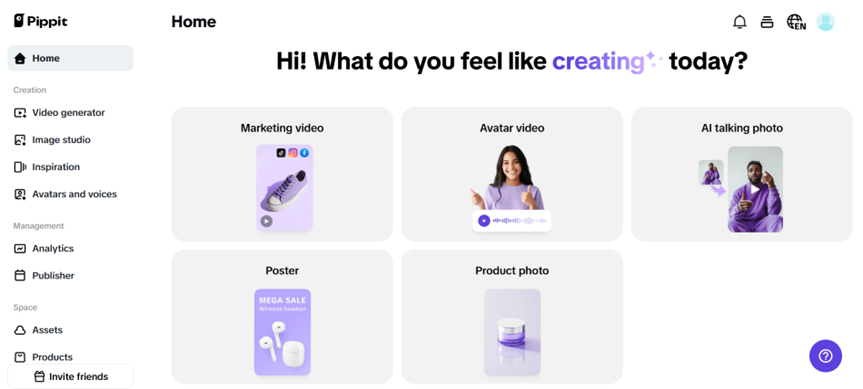
With a smart trimming workflow, you can transform cluttered audio into sharp intros, looping social clips, or high-impact ads that keep your brand vibe consistent. Let’s break down exactly how you can tighten your sound, where to trim, and how to make it loop so smoothly your audience never knows where the start or end is.
And the best part? Tools like Pippit make it super simple — no complicated software or steep learning curve. Let’s get into the nitty-gritty of audio editing that’ll keep your listeners hooked and your content on-brand.
Dead Space, Gaps, and Noise Are the Quiet Detritus of High-Quality Audio.
Even the best recording setup won’t save you from the tiny hiccups that sneak in. Maybe your mic picked up the air conditioner hum, or you left a few seconds of dead space while you gathered your next thought.
Tiny imperfections like these add up, especially in podcasts and reels where attention spans are tiny. You need to keep things tight, clean, and intentional.
Key troublemakers to trim out:
- Dead air: Long silences that add nothing to the message.
- Fillers: ‘Uhms’ and awkward pauses that break the flow.
- Background noise: The typical dangers of a home studio include hums, clicks, and distant dog barks.
- Rough edges: Popping sounds at the start or end of your track.
A quick trim can make a huge difference in whether people keep listening or skip to something shinier.
Make Looping Audio Feel Seamless
Let’s say you’re making an Instagram reel with a catchy music bed. If the loop point clicks or feels jarring, your audience notices — and it kills the vibe.
Smart trimming isn’t just about cutting dead space — it’s about finding the perfect loop point. Sometimes that means trimming mid-beat so the start and end match perfectly.
Pro tip: Always listen with fresh ears. What sounds good on your headphones might not loop cleanly on a phone speaker.
When Trimming Means More Than Silence
Tight audio also means knowing what to keep. Some ambient noise adds charm to a podcast. Some laughs or natural pauses make you sound human. Don’t over-trim your personality out of the track.
A good video trimmer like Pippit can even come in handy if you’re dealing with a video podcast — letting you match your audio cuts with visuals for a more polished final product.
Real-World Examples: Trimming Magic in Action
Example 1
A podcaster trims their intro music from 30 seconds to 8 seconds — no awkward fade-ins, no drawn-out theme. Now, the audience gets to the meat faster, increasing retention.
Example 2
A fitness creator trims the beats of a workout loop to fit a 15-second Instagram Story perfectly. The music loops seamlessly — no jump cut, no weird beat drop.
Example 3
A small brand repurposes a long video interview, using a video trimmer to cut short video clips. Then they trim the audio for teaser soundbites on TikTok. Double the reach, half the effort.
Ready to trim? here’s the smartest place to start
Before you get trimming happy, listen to your raw file a few times:
- Mark the spots with filler noise or gaps.
- Identify where your message starts to drag.
- Note any parts that feel abrupt and need a fade.
Then get your tools in order. That’s where Pippit’s easy audio trimmer shines — built right into the same space you’d use for trimming video or generating captions. Everything stays connected in one smooth workflow.
How to trim audio like a pro with Pippit
With Pippit, trimming your audio is simple, fast, and surprisingly fun. This is your detailed guide to achieving the ideal final cut.
Step 1: Import your audio file
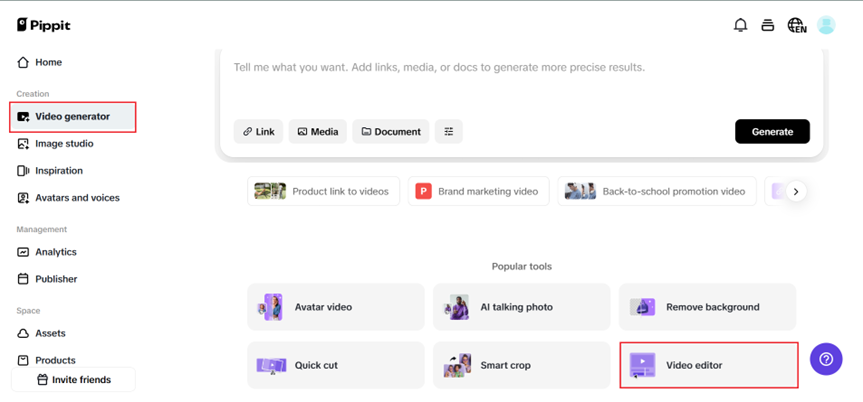
Click the ‘Video editor‘ tab after selecting ‘Video generator‘ on the Pippit site. You may upload your audio file from your device or cloud storage, or you can drag and drop it. Only a few clicks are needed to get started with this audio trimmer tool, which guarantees a seamless experience.
Step 2: Trim and refine the audio
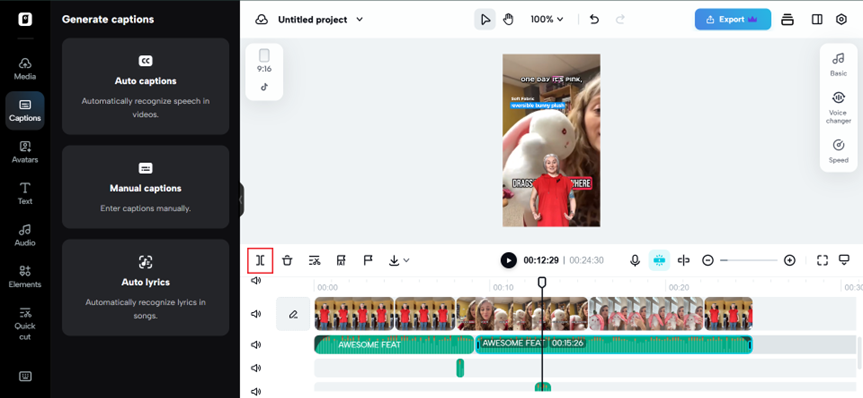
To establish start and stop points using the trimming handles, choose the audio track on the timeline and click the ‘Trim‘ button in the toolbar above. To lower noise, synchronise beats, and change volume, go to the ‘Audio‘ options. Use the ‘Fade‘ option to add fade-in/out effects for seamless transitions and a professional finish.
Step 3: Review and save
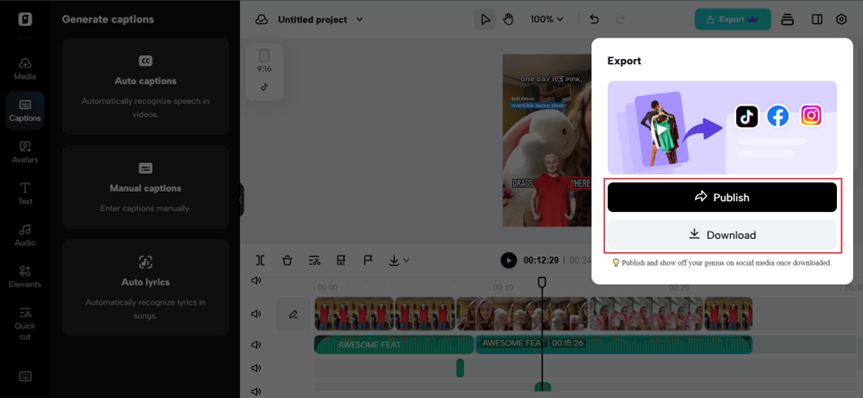
To make sure your reduced audio satisfies your needs, preview it. After making any last-minute changes, download your file in MP3 or another format. It’s never been simpler to export high-quality audio using Pippit’s online audio trimmer.
Smart tricks for tight, loop-ready audio
- Always fade in/out: A sudden start or end can sound harsh — a fade smooths the edges.
- Check your waveform: Look for natural points where the audio returns to baseline — great spots for clean cuts.
- Keep it consistent: If you’re trimming for a series (like multiple podcast intros), use the same settings to keep your vibe consistent.
Final thoughts: don’t let the noise steal your story
A polished final cut isn’t about fancy equipment or expensive studios — it’s about paying attention to the details that make people want to keep listening.
Your voice deserves to be heard without the clutter. The next time you hit record, remember that a few careful trims with the right tool can mean the difference between a tune-out and a loyal listener.
With Pippit, you’ve got everything you need to cut the noise — whether you’re trimming a podcast, prepping a loop for an ad, or pairing it with a quick video trimmer session for your next short-form clip.
Try Pippit today — keep your audio tight, your loops perfect, and your brand sounding its absolute best!