
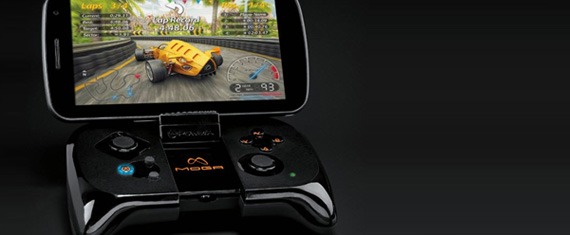
With mobile gaming becoming a more lucrative opportunity for game programmers, it seems only natural that an accessory would be developed to enhance the mobile gaming experience. With that in mind, PowerA has released the Moga Gaming controller for Android. Overall, I think this is a great attempt at a smartphone-video game peripheral, however, in the rush to release the product for the holiday season, I think some development may have been overlooked.
In order to use the controller, you need to download the Moga Pivot app. First of all, connecting my phone (HTC Amaze with Android v. 4.0.3) to the controller was unnecessarily problematic. It took me nearly half an hour and much Googling to finally get fully set up, because of permissions that need to be allowed in certain setting menus on your Android device. The app DOES have a help/troubleshooting button, but it only shows you suggestions to one minor issue, and then redirects you to the website for any other issue. Also, I should note that in the day I have had the Pivot application, I have had to force stop it at least 3 times due to freezing and sending me a notice with no option to clear the notice.
I also found other issues with the app that I would consider poor planning, rather than bad programming. For example, I found their library of downloadable games to be a bit lackluster. I recognized Pac-Man and a version of Doom, but not much else, and also many of the games required an extra fee to download (which I thought was a bit silly, considering the initial 49.99 to own the device needed to utilize the library).
Another thing I found bothersome (considering the item’s price) was the fact that The Moga App also has ads (If a 2.99 Words with Friends can remove ads, then it should be expected on this app), and stores your individual games amongst all your apps and clutters your menus. Just to compare, the emulator I purchased from the Google Play Store (Super GNES for 3.99) has no ads and a very expansive library with games I recognize (Final Fantasy 3/6 and Earthbound, among others) with no extra fees (that I have come across), and it organizes your games in the library within the app.
I did find one positive software quality though: it works wonderfully with my Super GNES emulator. PowerA’s website says they don’t support emulators, but I found that the experience with the Moga was much better when you don’t use the Moga app.
As far as the physical qualities of the controller (outside of controller eating phone battery life, which is to be expected), I found that the joysticks move very smoothly and the buttons are perfectly responsive without sticking. However, about fifteen minutes after I began playing a game with the controller, the bottom of my left hand started falling asleep. The controller IS slightly smaller than a typical gaming controller, but other than adjusting for that, I feel like I tried to hold the controller as normally as possible, but my hand still got really uncomfortable and half of my hand fell asleep, which makes me not want to use the device.
Overall, I think this product is a great idea. If the controller was selling for half the price or less (<$25), and I wasn't required to install the application on my phone, I probably would consider getting this for my Super GNES emulator. But, with the flaws I’ve listed, it seems more like a prototype than a final product. I’d say hold off on buying this version and wait for the next generation.
Score: 6.5
– Amber Taylor